
UTM Tracking, Conversion Tracking & Ad Performance: A Complete Guide to Knowing Which Ads Actually Generate Sales
Running paid ads without knowing which campaigns generate actual customers is like spending money with no way to measure the result.
You may see thousands of impressions, hundreds of clicks, and plenty of website visitors. But the important question is:
Which ad is actually generating leads, enquiries, purchases, or revenue?
This is where UTM tracking, conversion tracking, and creative-level performance analysis become essential.
Together, these techniques help businesses move beyond vanity metrics such as clicks and views and understand what is actually driving business results.
Why Tracking Your Ads Matters
Digital advertising platforms provide a large amount of performance data. However, simply looking at the number of clicks does not tell you whether your advertising is profitable.
For example, imagine you run three Facebook ads:
- Ad A receives 10,000 impressions and 500 clicks.
- Ad B receives 7,000 impressions and 250 clicks.
- Ad C receives 5,000 impressions and 150 clicks.
At first glance, Ad A appears to be the strongest because it generated the most clicks.
But suppose the actual results are:
- Ad A → 5 leads
- Ad B → 25 leads
- Ad C → 15 leads
Suddenly, the picture is very different.
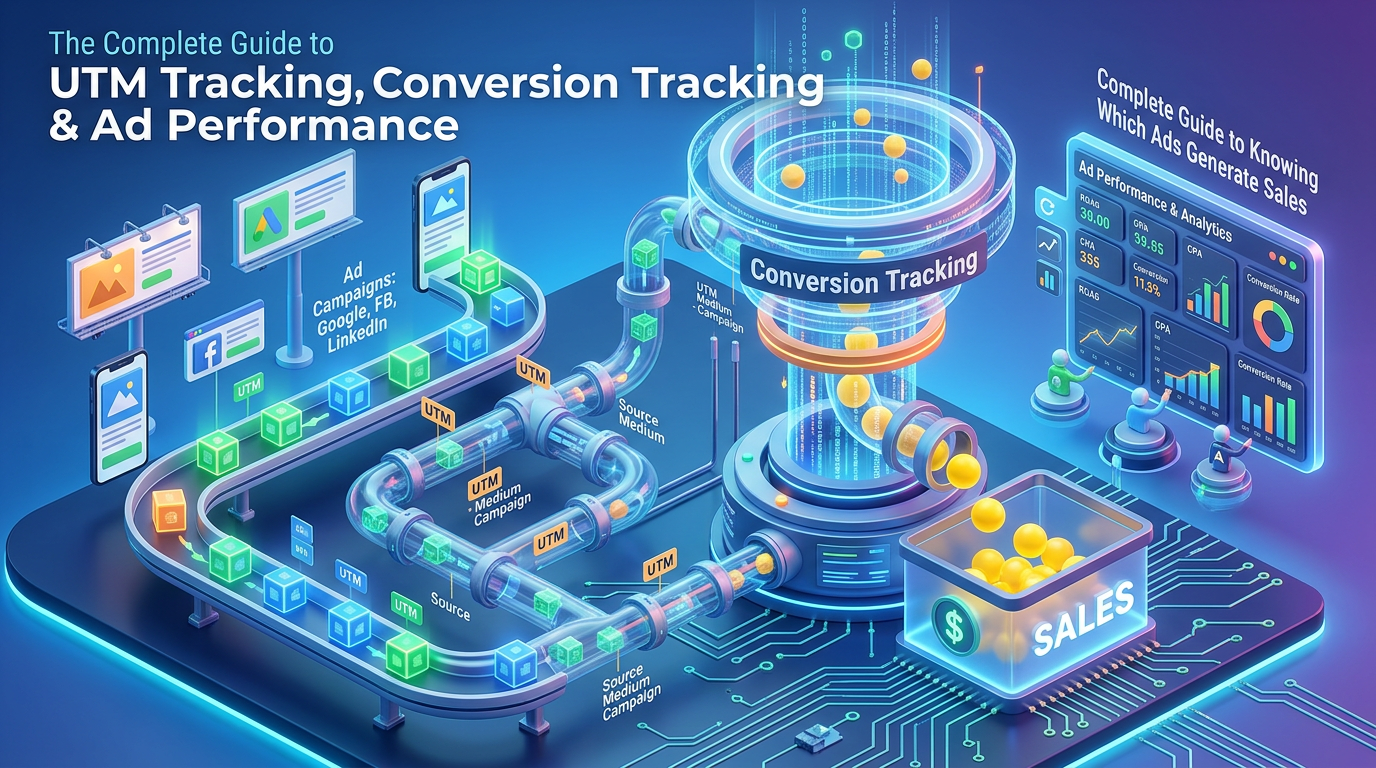
This is why businesses should track the complete customer journey:
Ad → Click → Website Visit → Lead/Purchase → Revenue
What Is UTM Tracking?
UTM stands for Urchin Tracking Module.
UTM parameters are small pieces of information added to a URL. They help analytics platforms identify where website traffic came from.
For example, instead of simply sending users to:
yourwebsite.com
you could use a tracked URL containing information about the campaign, source, medium, and content.
A typical UTM structure can identify:
- Source – Where the visitor came from
- Medium – The type of marketing channel
- Campaign – The specific campaign
- Content – The particular ad or creative
- Term – Often used for paid search keywords
This allows you to distinguish traffic generated by different campaigns and advertisements.
Example of UTM Tracking
Suppose you are promoting a product through two different Facebook ads.
One ad is a video explaining the product, while another is a customer testimonial.
You can create separate tracked links for each creative.
Then your analytics data can help you understand whether visitors came from:
- The product video
- The testimonial
- A particular campaign
- A particular advertising platform
This makes your marketing data much more useful.
Why Unique Links Matter
If multiple advertisements use exactly the same untracked URL, it can become difficult to determine which specific creative generated the visit.
Using appropriately configured UTM parameters allows businesses to organize their traffic data.
For example:
Campaign: Summer Sale
Source: Meta
Medium: Paid Social
Content: Video Ad 1
Another advertisement could use:
Campaign: Summer Sale
Source: Meta
Medium: Paid Social
Content: Testimonial Ad 1
Now you have a better basis for comparing the two creatives.
What Is Conversion Tracking?
UTM tracking tells you where traffic came from.
Conversion tracking helps you understand what happened after the visitor arrived.
A conversion is a valuable action that you want a visitor to complete.
Depending on the business, a conversion could be:
- Product purchase
- Lead form submission
- WhatsApp enquiry
- Phone call
- Account registration
- Newsletter signup
- Demo booking
- App download
- Contact form submission
For an e-commerce business, the primary conversion may be a purchase.
For a service business, it may be a qualified enquiry or consultation booking.
Why Clicks Alone Are Not Enough
Clicks are useful, but they are not the final business outcome.
Consider this example:
| Ad | Clicks | Leads | Sales |
|---|---|---|---|
| Ad A | 1,000 | 10 | 2 |
| Ad B | 600 | 40 | 12 |
| Ad C | 300 | 25 | 8 |
Ad A generated the most clicks, but Ad B generated significantly more leads and sales.
If you optimized your campaign only for clicks, you could end up allocating more budget to Ad A even though another creative is producing more meaningful business outcomes.
This is why conversion data should be considered alongside traffic data.
How Conversion Tracking Works
Conversion tracking generally involves identifying important actions on your website or digital property and recording when those actions occur.
Depending on your setup, tracking can involve:
- Analytics events
- Advertising platform pixels or tags
- Google Tag Manager
- Website code
- Server-side tracking
- CRM integration
- E-commerce tracking
The exact implementation depends on the website, advertising platform, privacy requirements, and type of conversion being measured.
Google Analytics for Website Tracking
Google Analytics can help businesses understand how users interact with their websites and digital properties.
It can provide insights into areas such as:
- Traffic sources
- Landing pages
- User engagement
- Events
- Conversions
- Campaign performance
- User journeys
The key is not simply installing analytics but configuring the events and conversions that matter to your business.
Example
Suppose you run Google and Meta advertising campaigns for a consultation service.
Your analytics setup could help you examine:
Ad → Landing Page → Contact Form → Consultation Enquiry
You can then investigate which campaign and traffic source are associated with those enquiries.
Google Tag Manager for Conversion Tracking
Google Tag Manager helps businesses manage many tracking tags and related configurations without manually changing website code for every tracking requirement.
It can be used to help configure tracking for actions such as:
- Button clicks
- Form submissions
- Page views
- Video interactions
- Downloads
- Certain conversion events
For businesses running multiple marketing campaigns, a structured tag-management setup can make tracking easier to maintain.
Meta Ads Manager for Ad Performance
Meta Ads Manager provides performance information for advertising campaigns across Meta’s advertising ecosystem.
Depending on the campaign and configuration, advertisers can analyze metrics such as:
- Impressions
- Reach
- Clicks
- Click-through rate
- Cost per result
- Leads
- Purchases
- Conversion value
- Return on ad spend
The most useful metrics depend on the campaign objective.
What Is Creative-Wise Performance Analysis?
Your campaign may contain multiple creatives.
For example:
- Video Ad 1
- Video Ad 2
- Customer Testimonial
- Product Demonstration
- Static Image
- Carousel
- Different headlines
- Different calls to action
Instead of looking only at the overall campaign performance, compare the individual creatives.
Example
Imagine you spend ₹10,000 across three creatives:
| Creative | Spend | Leads | Cost per Lead |
|---|---|---|---|
| Video A | ₹3,500 | 20 | ₹175 |
| Video B | ₹3,000 | 8 | ₹375 |
| Image C | ₹3,500 | 25 | ₹140 |
The creative receiving the most views or clicks isn’t necessarily generating the most efficient results.
Looking at cost per lead, lead quality, sales and revenue gives you a more meaningful picture.
Views Do Not Always Mean Sales
One of the biggest mistakes in digital advertising is assuming that high engagement automatically means high revenue.
A video can generate:
- Thousands of views
- Hundreds of likes
- Numerous comments
- Strong watch time
and still generate very few customers.
Another creative may receive fewer views but attract people who are more likely to buy.
Therefore, businesses should distinguish between:
Attention metrics and business outcome metrics.
Attention metrics include:
- Views
- Impressions
- Reach
- Likes
- Comments
- Shares
Business outcome metrics may include:
- Leads
- Qualified leads
- Purchases
- Revenue
- Cost per acquisition
- Return on ad spend
Both categories can be useful, but they answer different questions.
A Simple Three-Layer Tracking Framework
A practical advertising measurement system can be divided into three layers.
Layer 1: Identify the Traffic Source
Use UTM parameters and campaign naming conventions to identify:
Where did the visitor come from?
For example:
- Google Ads
- Meta Ads
- LinkedIn Ads
- Influencer campaign
- Affiliate campaign
Layer 2: Track the Conversion
Determine:
What did the visitor do?
Examples:
- Submitted a form
- Called the business
- Started checkout
- Completed a purchase
- Booked a consultation
Layer 3: Measure the Business Result
Finally ask:
Did the conversion create business value?
This could mean:
- Revenue generated
- Customer acquired
- Qualified lead generated
- Subscription started
- Cost saved
This third layer is particularly important for businesses with longer sales cycles.
How to Set Up an Effective Tracking System
Start by identifying the actions that actually matter to your business.
Step 1: Define Your Conversion
Before installing tracking tools, decide what counts as a successful outcome.
For example:
E-commerce: Completed purchase
Consulting business: Qualified enquiry
SaaS company: Demo booking or paid subscription
Real estate: Qualified property enquiry
Education business: Course registration
Step 2: Create Consistent UTM Parameters
Use a consistent naming convention across campaigns.
Avoid creating random campaign names every time you launch an advertisement.
A structured naming system makes reporting much easier.
Step 3: Configure Your Analytics
Make sure your analytics platform is properly installed and that relevant events and conversions are configured.
Step 4: Configure Tags and Tracking
Use an appropriate tag-management or tracking system to implement required marketing and analytics tags.
Step 5: Connect Advertising Platforms
Make sure your advertising platforms are configured to receive the conversion signals they need.
Step 6: Test Everything
This step is often overlooked.
Before spending significant amounts on advertising, test whether:
- The UTM parameters are being recorded correctly.
- Website events are firing.
- Forms are tracked.
- Purchases are recorded.
- Conversion values are correct.
- Advertising platforms are receiving conversion signals.
A tracking system that is incorrectly configured can lead to misleading conclusions.
Common Ad Tracking Mistakes
Mistake 1: Tracking Only Clicks
Clicks tell you that someone interacted with the advertisement.
They do not necessarily tell you whether the person became a customer.
Mistake 2: Using the Same Tracking Information Everywhere
Poor campaign naming and inconsistent UTM structures can make reporting confusing.
Mistake 3: Ignoring Lead Quality
Ten leads are not necessarily better than five leads.
If five leads are highly qualified and two become customers, they may create more value than dozens of low-quality enquiries.
Mistake 4: Optimizing for Vanity Metrics
High views and engagement can be useful indicators, but they should not automatically be treated as evidence of profitability.
Mistake 5: Not Testing Tracking
Always verify your tracking before relying on the data to make advertising decisions.
Mistake 6: Looking at Only One Platform
Your advertising platform may report conversions differently from your analytics platform or CRM.
Differences can occur because of attribution methods, reporting windows, privacy restrictions, browser limitations, and other technical factors.
UTM Tracking vs Conversion Tracking
These two concepts are related but serve different purposes.
| Feature | UTM Tracking | Conversion Tracking |
|---|---|---|
| Main purpose | Identify traffic source | Measure desired actions |
| Focus | Where users came from | What users did |
| Useful for | Campaign attribution | Lead/sale measurement |
| Example | Meta video campaign | Form submission |
| Key question | “Where did this visitor come from?” | “Did this visitor convert?” |
Using both together gives businesses a more complete view of the customer journey.
The Three Tools Every Advertiser Should Understand
A basic tracking stack can include:
Google Analytics — for understanding website traffic and user behaviour.
Google Tag Manager — for managing tracking tags and event implementations.
Meta Ads Manager — for monitoring and optimizing Meta advertising performance.
These tools serve different purposes, so they should be viewed as complementary rather than interchangeable.
How to Turn Tracking Data Into Better Advertising Decisions
Once your tracking is working, don’t simply collect the data.
Use it to ask better questions.
For example:
- Which campaign generates the most qualified leads?
- Which creative has the lowest cost per acquisition?
- Which landing page produces more conversions?
- Which traffic source generates higher-value customers?
- Which advertisement generates clicks but very few conversions?
- Which creative generates fewer clicks but more sales?
- How much does it cost to acquire one customer?
These questions can help you make more informed decisions about campaign structure, creative testing, landing pages, and budget allocation.
A Practical Example
Imagine a digital marketing agency runs two advertisements.
Ad A: Educational video
Ad B: Client testimonial
After tracking the campaigns, the agency discovers:
Ad A
- 20,000 impressions
- 1,000 clicks
- 30 leads
- 3 customers
Ad B
- 12,000 impressions
- 500 clicks
- 35 leads
- 7 customers
If you looked only at impressions or clicks, Ad A would appear stronger.
But the complete conversion journey provides additional information.
Ad B generated fewer clicks but more leads and customers.
This demonstrates why advertising decisions should be based on the metrics connected to the actual business objective.
Privacy and Tracking Considerations
Digital tracking must also be implemented responsibly.
Businesses should consider:
- Applicable privacy laws and regulations
- Cookie and consent requirements
- Platform-specific policies
- Data minimization
- Proper handling of customer information
- Appropriate analytics configuration
Tracking should be designed to measure marketing performance without unnecessarily collecting personal information.
Final Takeaway
Successful digital advertising is not simply about spending more money or getting more clicks.
It is about understanding what happens after the click.
A practical measurement framework is:
UTM Tracking → Identify the Traffic Source
Conversion Tracking → Measure the Desired Action
Creative Analysis → Compare Individual Ads
Business Metrics → Understand Leads, Customers and Revenue
Tools such as Google Analytics, Google Tag Manager, and Meta Ads Manager can support this process when they are configured correctly.
The goal is simple: don’t just ask which ad gets attention. Ask which campaign and creative contribute to meaningful business results.
When your tracking is structured properly, your advertising data becomes much more useful for testing, optimization, and informed marketing decisions.

Leave a Reply