
Why Your Website Is Losing Clients and You Don’t Even Know It
Your website can look attractive and still cost you customers.
A visitor may find your business through Google, Instagram, Facebook, or a WhatsApp link. They click your website expecting a quick answer: What do you offer? Can I trust you? How much does it cost? How do I book?
If your website makes those answers difficult to find, potential customers may simply leave.
For businesses in Kochi and across Kerala, where customers increasingly discover salons, clinics, restaurants, consultants, agencies, home services and other businesses online, your website is often the first sales conversation.
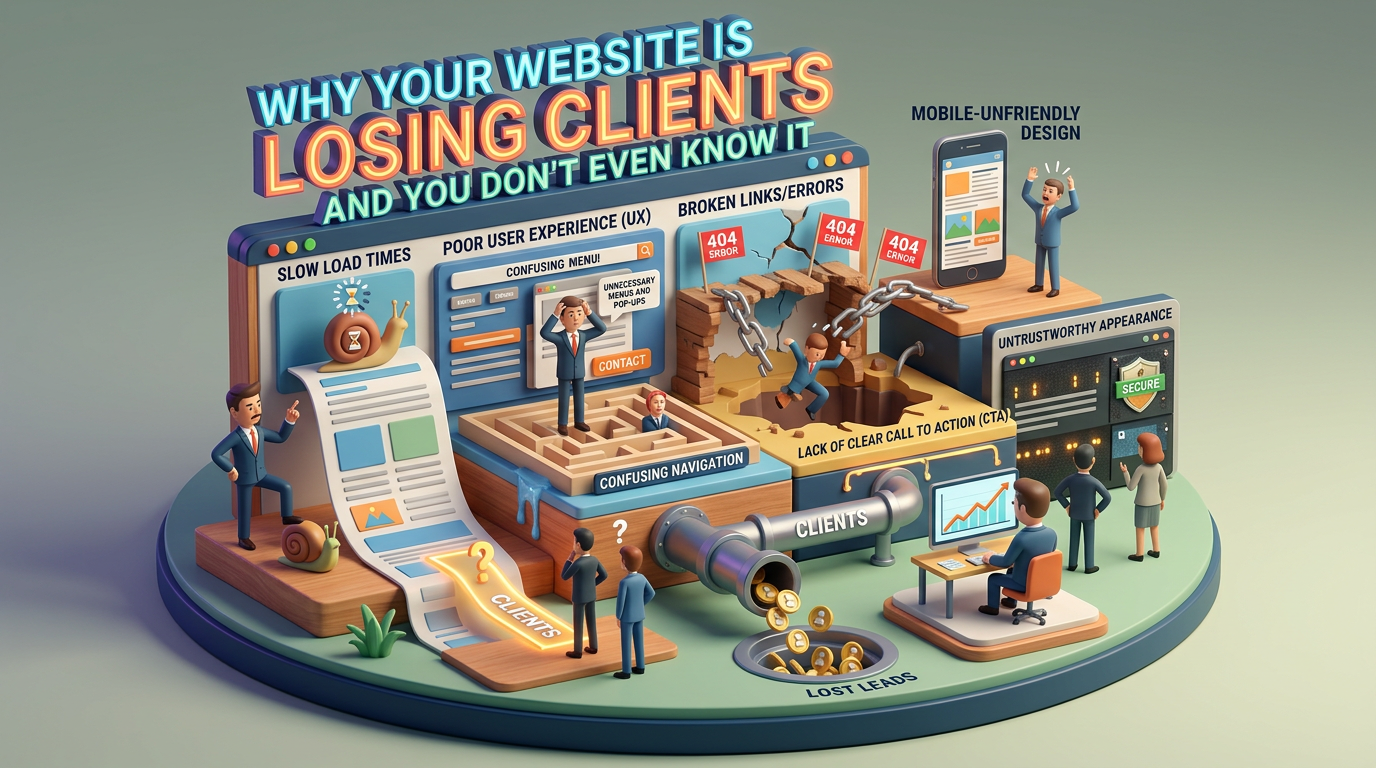
A slow website, confusing navigation, missing call-to-action, weak social proof or difficult booking process can turn valuable traffic into lost opportunities.
The good news? Many of these problems are fixable.
Reason 1: Your Website Is Too Slow
Website speed is one of the first things you should audit.
Imagine someone searches for a salon in Kochi on their phone. They find your website, tap the link and see a loading screen stuck at 99%.
They wait.
Nothing happens.
They leave and open another business website.
That’s a lost customer.
Google also considers page experience and performance-related signals as part of its broader ranking systems, so improving website performance can benefit both users and search visibility.
What Makes a Website Slow?
Common causes include:
- Large, uncompressed images
- Too many videos loading automatically
- Poorly optimized JavaScript and CSS
- Excessive plugins
- Slow hosting
- Unnecessary tracking scripts
- Heavy website themes
- Poor mobile optimization
- Third-party widgets loading before the main content
How to Improve Website Speed
Start with the basics.
Compress large images and use modern formats such as WebP or AVIF where appropriate.
Avoid uploading a 5 MB image when a properly optimized 200–400 KB version can provide the same visual experience.
You should also review:
- Hosting performance
- Image sizes
- Core Web Vitals
- Browser caching
- Unused plugins
- JavaScript loading
- Font loading
- Third-party scripts
Most importantly, test the website on an actual mobile connection—not just your office Wi-Fi.
Reason 2: There Is No Clear Call to Action
A visitor shouldn’t have to figure out what you want them to do next.
If someone wants to book an appointment, make the booking option obvious.
If they want a quotation, provide a quotation button.
If they want to speak with you, make contacting you easy.
A website without a clear CTA can create unnecessary friction.
Examples of Strong CTAs
Depending on your business, your CTA could be:
- Book an Appointment
- WhatsApp Us
- Get a Free Consultation
- Request a Quote
- Schedule a Call
- Order Now
- Check Availability
- Get Directions
- Download the Guide
For a local service business, a prominent WhatsApp or booking button can be particularly useful because customers may already be comfortable communicating through WhatsApp.
Make the First Action Simple
Don’t force visitors through five pages just to contact you.
For example:
Instagram → Website → Find service → WhatsApp → Booking
is generally easier than:
Instagram → Website → About → Services → Contact → Form → Email → Wait
The fewer unnecessary steps between intent and action, the better.
Reason 3: Your Website Does Not Build Enough Trust
People don’t buy from websites simply because the website looks good.
They buy when they feel confident.
For a local business, trust can come from genuine customer reviews, testimonials, credentials, photos, case studies and transparent information.
What Should You Add?
Consider displaying:
- Google reviews
- Genuine customer testimonials
- Business photographs
- Team photographs
- Before-and-after examples where appropriate
- Certifications and qualifications
- Years of experience
- Client logos where permitted
- Case studies
- Frequently asked questions
- Clear contact information
- Physical location and Google Maps
- Secure payment information where relevant
For a Kochi business, local proof can be particularly powerful.
A genuine testimonial mentioning the service and location can feel much more credible than generic marketing copy.
Don’t Fake Social Proof
Never manufacture reviews, bookings or testimonials.
If you don’t have many reviews yet, focus on delivering a good customer experience and ethically asking genuine customers to leave feedback.
Real proof compounds over time.
Reason 4: Your Mobile Website Is an Afterthought
A large percentage of local searches happen on smartphones.
That means your website should not simply be a desktop website squeezed onto a smaller screen.
Buttons need to be easy to tap.
Text needs to be readable.
Images need to fit properly.
Forms should be short.
Navigation should be simple.
And important actions—such as calling, WhatsApp or booking—should be easy to access.
Mobile Website Checklist
Ask yourself:
- Can I understand the business within five seconds?
- Can I find the phone number immediately?
- Can I find WhatsApp or booking?
- Does the menu work properly?
- Are buttons large enough to tap?
- Does the page load quickly?
- Are forms easy to complete?
- Does the checkout or booking process work?
- Are important images and text visible without excessive scrolling?
Test these things on multiple phones rather than assuming they work because they work on your own device.
Reason 5: Your Website Talks About You Instead of the Customer
Another common problem is excessive company-focused content.
For example:
“We are a leading business providing world-class solutions.”
That sentence doesn’t answer the customer’s immediate question.
Instead, explain:
- What problem do you solve?
- Who is the service for?
- What does it cost or how is pricing handled?
- Why should someone choose you?
- How does the process work?
- What should the customer do next?
Turn Features Into Customer Benefits
Instead of:
“Advanced facial treatment technology.”
Try:
“Reduce the appearance of common skin concerns with a personalized facial treatment designed around your skin type.”
The second version explains why the customer should care.
Reason 6: Your Booking Process Is Too Complicated
Even if your website generates interest, you can lose the customer during booking.
A long form can discourage people.
A confusing calendar can create friction.
A broken payment page can end the sale.
An unanswered contact form can turn a lead into a competitor’s customer.
Create a Low-Friction Booking Journey
For a local business, the journey could be:
Visitor → Service → Price/Details → Book Now → WhatsApp/Booking System → Confirmation
Keep the number of decisions low.
If you need information from the customer, ask only for what is genuinely necessary at the first stage.
Reason 7: Your Website Does Not Answer Common Customer Questions
Potential customers often have the same questions repeatedly.
For example, a Kochi salon might receive:
- What services do you offer?
- How much does a haircut cost?
- Do I need an appointment?
- Where are you located?
- Is parking available?
- What are your opening hours?
- Do you accept UPI?
- Can I book through WhatsApp?
A good FAQ section can answer these questions before the customer contacts you.
It can also help search engines understand the topics your website covers.
Build FAQs From Real Conversations
Don’t randomly create questions for SEO.
Look at:
- WhatsApp messages
- Phone calls
- Instagram DMs
- Google reviews
- Sales conversations
- Customer-support questions
These are valuable sources of real search intent.
Fix 1: Improve Speed and Make Booking One Click Away
Once you’ve identified the problems, start with the highest-impact improvements.
First, improve page performance.
Then make the primary CTA obvious.
For example:
Fast-loading website + prominent WhatsApp button + clear service information
can create a much smoother customer journey.
A Simple Homepage Structure
A local service website could follow this structure:
Hero Section
What you offer + who you help + primary CTA
Services
Your key services with concise descriptions
Why Choose Us
Relevant differentiators
Reviews
Genuine customer feedback
Results/Portfolio
Real examples where appropriate
FAQs
Answers to common questions
Location & Contact
Phone, WhatsApp, address, map and opening hours
Final CTA
Book / Call / WhatsApp / Request Quote
Fix 2: Add an AI Receptionist
AI can also be used to handle repetitive website conversations.
An AI receptionist can potentially answer common questions at any time, depending on how the system is configured.
For example, a website visitor could ask:
“Do you have appointments available tomorrow?”
The AI could explain the available booking process or connect the customer to the appropriate booking system.
Another customer might ask:
“How much is your bridal package?”
The AI could provide the information you’ve configured or direct the visitor to the relevant page.
What Can an AI Receptionist Handle?
Depending on the implementation, it can help with:
- Frequently asked questions
- Service information
- Basic lead qualification
- Appointment enquiries
- Location information
- Opening hours
- Pricing information
- Lead collection
- Booking-system handoffs
- Follow-up workflows
It should not invent information.
If the AI doesn’t know the answer, it should clearly direct the customer to a human or an official information source.
Malayalam Support Can Matter for Local Businesses
For businesses serving Kerala customers, multilingual communication can improve accessibility.
If your audience prefers Malayalam, consider offering Malayalam alongside English rather than forcing every visitor into one language.
The objective isn’t simply to add an AI chatbot.
The objective is to make it easier for a real customer to get an answer and take the next step.
The Kochi Salon Example
Consider a hypothetical Kochi salon.
Before the website audit:
- Slow mobile loading
- No obvious booking button
- Weak customer proof
- Complicated contact process
- No automated FAQ support
After the redesign:
- Optimized images
- Faster mobile experience
- Prominent WhatsApp/booking CTA
- Genuine customer reviews
- Clear service pages
- FAQ section
- AI-assisted enquiry handling
The business hasn’t necessarily increased its advertising budget.
Instead, it has improved what happens after someone visits the website.
That’s an important distinction.
More traffic isn’t always the answer.
Sometimes the problem is conversion.
Don’t Confuse Traffic With Results
Imagine two businesses each receive 1,000 website visitors.
Business A converts 1% of visitors.
Business B converts 3%.
The difference is:
Business A: 10 conversions
Business B: 30 conversions
Same traffic.
Different website experience.
This is why website conversion rate optimization matters.
You should measure what happens after visitors arrive—not simply how many visitors you receive.
What Should You Measure?
A website audit should go beyond design.
Track metrics such as:
- Website visitors
- Mobile vs desktop traffic
- Engagement
- Landing-page performance
- Conversion rate
- WhatsApp clicks
- Phone clicks
- Booking starts
- Completed bookings
- Form submissions
- Abandoned forms
- Page speed
- Search traffic
- Search rankings for important queries
For example, if 500 people visit your service page but only two contact you, the question isn’t necessarily “How do I get more traffic?”
It may be:
Why aren’t those 500 visitors taking action?
A Practical Website Audit Checklist
Use this checklist to review your website today.
Speed
- Does the homepage load quickly?
- Are images optimized?
- Does the website perform well on mobile?
- Have you checked Core Web Vitals?
- Are unnecessary scripts slowing the site down?
Conversion
- Is the main CTA obvious?
- Can visitors contact you quickly?
- Is WhatsApp available where appropriate?
- Is the booking process simple?
- Are forms short and easy?
Trust
- Do you have genuine reviews?
- Are testimonials visible?
- Do visitors know who is behind the business?
- Are credentials or certifications relevant to the service?
- Is your location clearly displayed?
Content
- Is it immediately clear what you offer?
- Are prices or pricing processes explained?
- Are common questions answered?
- Are service pages specific?
- Does the content focus on customer problems and outcomes?
Mobile UX
- Are buttons easy to tap?
- Is text readable?
- Does the menu work?
- Are images properly sized?
- Can someone book without struggling?
SEO
- Does each important service have a dedicated page?
- Are page titles and descriptions optimized?
- Are headings logically structured?
- Is your business information consistent?
- Are local keywords used naturally?
- Is your website technically crawlable?
The Biggest Website Mistake: Assuming “It Works” Means “It Converts”
Your website may technically work.
The links may open.
The pages may exist.
The contact form may submit.
But that doesn’t necessarily mean the website is effective.
A conversion-focused audit asks a different question:
Can a potential customer understand, trust and act on this website without unnecessary friction?
That’s the standard your website should meet.
Final Takeaway: Your Website Should Help You Sell
Your website isn’t just an online brochure.
For many businesses, it is part of the sales funnel.
If the website is slow, confusing or difficult to trust, you may be losing customers before they ever speak to you.
Start with the fundamentals:
Speed → Clarity → Trust → CTA → Simple Booking → Follow-up
Then consider advanced tools such as AI receptionists and automated workflows where they genuinely improve the customer experience.
And remember: don’t chase impressive-looking website features just because they’re trendy.
A simple website that loads quickly, answers questions, builds trust and makes booking easy can be far more valuable than a visually impressive website that makes customers work to find what they need.
Your next customer may already be visiting your website. The question is whether your website is helping them—or sending them somewhere else.

Leave a Reply